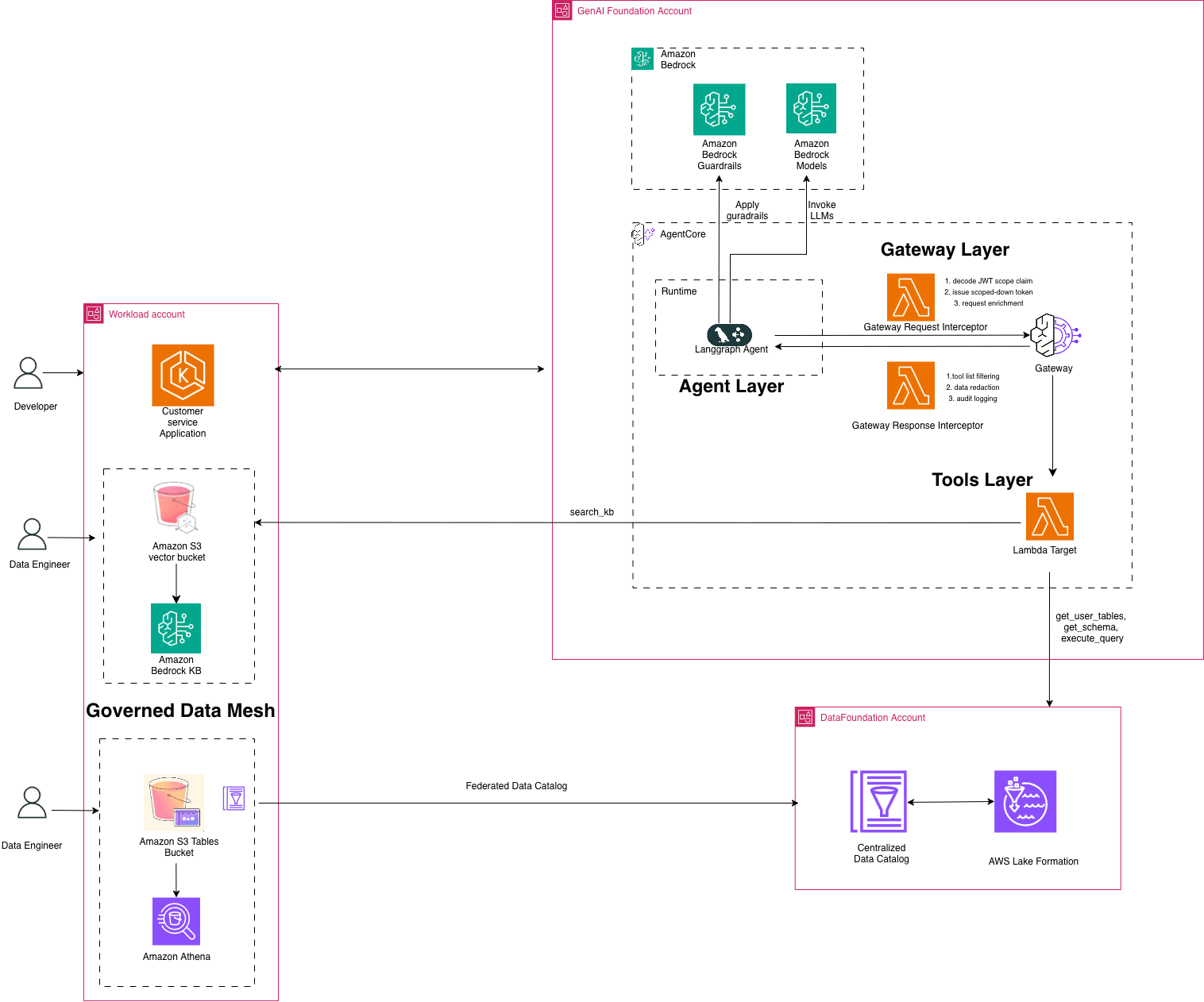
TL;DR: To run production‑ready agentic AI on AWS, first create a serverless data mesh with AWS Lake Formation, AWS Glue, and Amazon OpenSearch. Then expose the mesh through Amazon Bedrock agents, add fine‑grained IAM policies, and monitor with CloudWatch. The guide below lists everything you need before you start, each configuration step, and tips to keep costs and latency low.
Key takeaways
- Agentic AI needs a governed, serverless data mesh to retrieve up‑to‑date context safely.
- AWS services such as Lake Formation, Glue, and OpenSearch provide the core mesh components.
- Amazon Bedrock agents act as the execution layer that can call the mesh in real time.
- Fine‑grained IAM, encryption at rest, and audit logging are mandatory for compliance.
- Pro tips include using data product catalogs, incremental crawlers, and cost‑aware scaling.
The exact problem
Enterprises want AI agents that can act autonomously—searching for data, reasoning, and invoking downstream services—without exposing raw data lakes to every model. Traditional monolithic data lakes create bottlenecks, increase security risk, and make it hard to enforce governance at scale. The challenge is to give each agent just‑in‑time access to the right data while keeping the underlying infrastructure serverless, cost‑effective, and auditable.
Why a modern data mesh matters for agentic AI
A data mesh treats data as a product owned by domain teams. On AWS, the mesh can be built with managed services that automatically handle scaling, encryption, and cataloging. This approach aligns with the requirements of agentic AI, which needs:
- Low‑latency, point‑in‑time reads of structured and unstructured assets.
- Policy‑driven access that can be changed without redeploying models.
- Observability for each data request made by an agent.
According to the AWS Machine Learning Blog, a governed, serverless data mesh on AWS provides the secure, scalable foundation that production‑grade agentic AI demands.
Prerequisites
Before you start, make sure you have the following in place:
- AWS account with appropriate permissions. You will need admin rights to create Lake Formation resources, Glue crawlers, and Bedrock agents.
- Amazon Bedrock access. Bedrock agents are the execution layer that will call the mesh.
- Data sources ready for ingestion. Typical sources include S3 buckets, RDS databases, or streaming data in Kinesis.
- IAM roles for data product owners. Define separate roles for domain teams that will own the data products.
- Basic knowledge of AWS CLI or SDK. The guide uses both console steps and CLI snippets.
If any of these items are missing, pause and provision them. Skipping a prerequisite usually leads to permission errors later in the workflow.
Step‑by‑step workflow
This section walks you through building the mesh, exposing it to agents, and wiring up monitoring.
- Create a Lake Formation data catalog. In the Lake Formation console, enable the data catalog for your account. This catalog becomes the single source of truth for all data assets.
CLI example:aws lakeformation register-resource --resource-arn arn:aws:s3:::my-data-bucket - Define data domains and register data products. For each business domain (e.g., finance, marketing), create a separate database in the catalog. Register the underlying S3 locations as tables using AWS Glue crawlers. Set up crawlers to run on a schedule that matches your data freshness needs.
- Apply fine‑grained permissions. Use Lake Formation to grant read, write, or transform rights to IAM roles. For agentic AI, grant the Bedrock execution role
SELECTon the tables it needs, and deny broader access.
CLI example:aws lakeformation grant-permissions --principal DataLakePrincipalIdentifier=arn:aws:iam::123456789012:role/BedrockAgentRole --permissions SELECT --resource '{"Table": {"DatabaseName":"finance","Name":"transactions"}}' - Enable serverless query engines. Activate Amazon Athena for ad‑hoc SQL and Amazon OpenSearch for full‑text search. Both services read directly from the catalog without provisioning clusters.
- Build a Bedrock agent. In the Bedrock console, create a new agent and point its knowledge base to the Athena workgroup and OpenSearch domain you just configured. Add the IAM role created in step 3 as the agent’s execution role.
- Test the agent with a simple prompt. Use the Bedrock console’s test pane: “What were the total sales in Europe last quarter?” The agent should translate the request into an Athena query, fetch results, and return them.
- Set up CloudWatch metrics and alarms. Emit custom metrics for query latency, error rates, and data‑product usage. Create alarms that trigger SNS notifications if latency exceeds a threshold.
- Implement audit logging. Enable Lake Formation audit logs to S3. Configure CloudTrail to capture Bedrock agent invocations. This satisfies compliance requirements and gives you a forensic trail.
- Automate CI/CD for data‑product updates. Use AWS CodePipeline to run Glue crawler updates on every code push. Include a step that validates IAM policies with
aws iam simulate-principal-policy. - Scale cost‑effectively. Turn on Athena’s result reuse feature to cache frequent queries. For OpenSearch, enable ultra‑warm storage for older logs.
When each step completes without error, you have a fully governed, serverless data mesh that agentic AI can query in real time.
Pro tips for production deployments
- Catalog data as products, not assets. Attach owners, SLAs, and version tags to each table. This makes it easier to audit who changed a schema.
- Use incremental crawlers. Instead of full scans, configure crawlers to detect only new or changed files. This reduces Glue costs dramatically.
- Leverage Athena workgroup settings. Enable
ResultReuseEnabledand setBytesScannedCutoffPerQueryto prevent runaway queries. - Separate dev and prod meshes. Clone the catalog and apply stricter IAM policies in prod. Use AWS Organizations to enforce guardrails.
- Monitor latency at the agent level. Bedrock emits
InvocationLatencymetrics; combine them with Athena query time to spot bottlenecks.
What happens next
With the mesh in place, you can start adding more sophisticated agents—ones that call external APIs, write back to databases, or orchestrate multi‑step workflows. The same governance model scales: each new data product simply registers in Lake Formation and receives a scoped IAM role.
Keep an eye on the AWS Machine Learning Blog for updates on new Bedrock features and Lake Formation policy extensions. As the ecosystem evolves, you’ll be able to replace custom code with managed capabilities, further reducing operational overhead.
📎 Related Articles
Build Production‑Grade AI Agents for Financial Compliance: Stripe’s Playbook • Build a Voice Healthcare Appointment Agent with Amazon Nova 2 Sonic • Build Production‑Grade AI Agents for Finance Compliance • NVIDIA Blackwell Ultra Sets New Power‑Efficiency Standard for Agentic AI • NVIDIA, Foxconn & Taiwan Med Centers Deploy Agentic AI for Health