Problem
Clinics and hospitals waste valuable time when patients miss scheduled visits or call in to change appointments. Manual reminder calls consume staff hours, and missed appointments hurt revenue and care continuity. A scalable voice solution that can authenticate patients, confirm or adjust appointments, and collect pre‑visit information would free staff for higher‑value tasks and lower no‑show rates.
Prerequisites
- Active AWS account with permission to use Amazon Bedrock and Amazon Nova 2 Sonic.
- Basic familiarity with AWS Identity and Access Management (IAM) and the AWS Management Console.
- Access to a patient‑appointment database or scheduling API (for example, a FHIR server or a custom REST endpoint).
- Voice‑recorded prompts or text‑to‑speech configuration for the agent’s spoken responses.
- Optional: a small test group of patients to run pilot calls.
Steps
1. Provision the core services
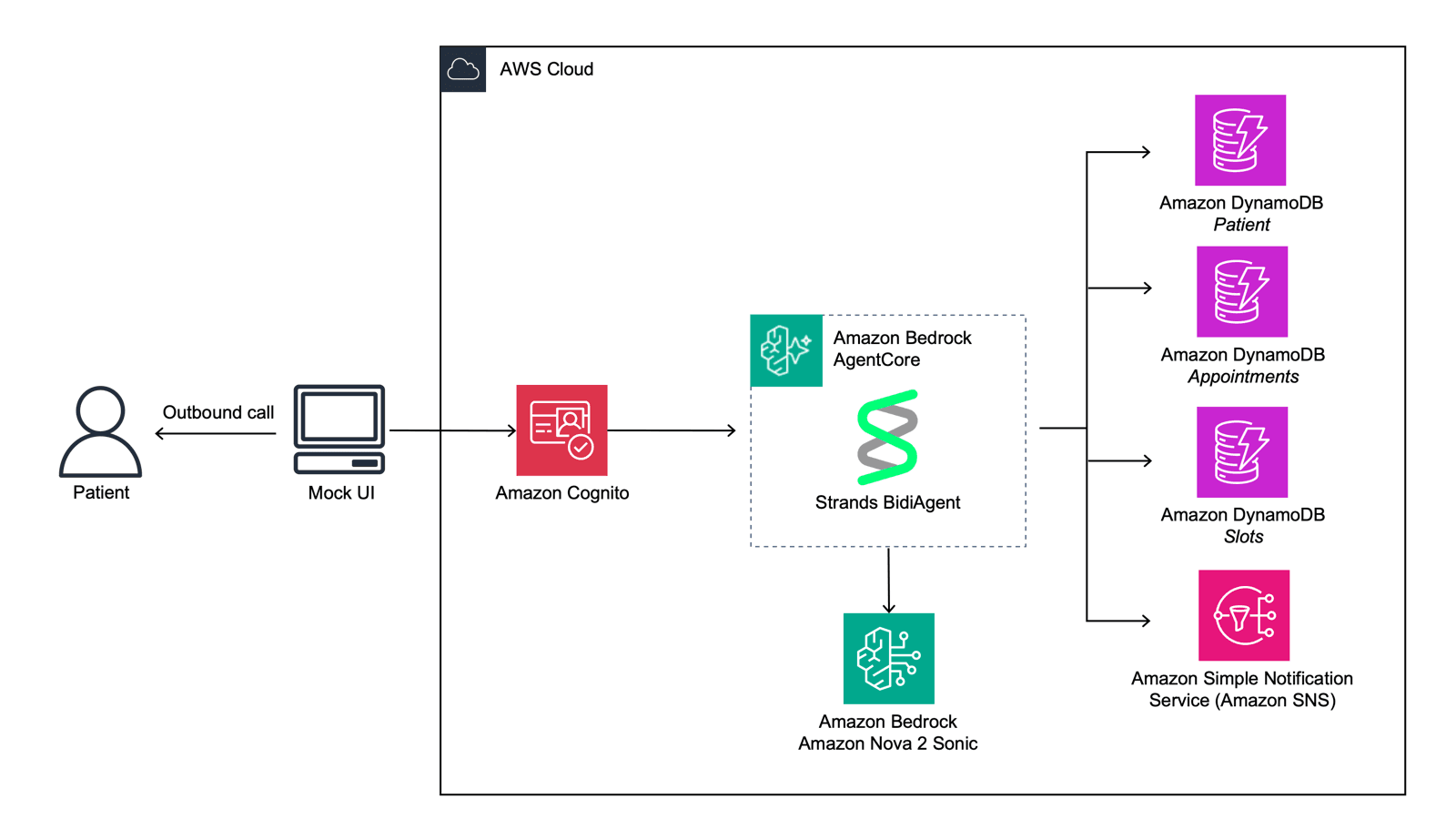
Log in to the AWS console and enable Amazon Bedrock in the region where you plan to run the agent. Create a new Bedrock AgentCore resource; this will host the conversation logic and tool orchestration. In the same console, locate Amazon Nova 2 Sonic under the “Generative AI” section and enable the model for your account. Nova 2 Sonic provides the high‑quality speech‑to‑text and text‑to‑speech capabilities needed for a natural phone‑based experience.
2. Define the conversation flow
Using the AgentCore UI, start a new agent project called HealthApptAgent. Add intents that match the core tasks described in the AWS blog: AuthenticatePatient, ConfirmAppointment, CancelAppointment, RescheduleAppointment, and CollectPreVisitInfo. For each intent, write sample utterances (e.g., “I’d like to change my appointment”) and map them to the corresponding tool calls.
According to the AWS Machine Learning Blog, the sample agent authenticates patients by voice and then manages appointments, including confirmation, cancellation, and rescheduling. Replicate that flow by placing the authentication step first; only after a successful voice match should the agent invoke scheduling tools.
3. Connect to your scheduling backend
In AgentCore, add a Tool for each backend operation. For example, a GetAppointment Lambda function can query the patient’s next appointment based on a unique identifier returned by the voice authentication step. Similarly, UpdateAppointment and CancelAppointment functions will write changes back to the database. Ensure each Lambda has an IAM role that permits read/write access to the scheduling API.
When the agent needs to collect pre‑visit health information, attach another tool that writes the responses to an EHR‑compatible endpoint. The AWS blog notes that the agent can gather this data before the patient sees a clinician, streamlining the intake process.
4. Set up voice interaction with Nova 2 Sonic
Configure a new Voice Interaction in the Nova 2 Sonic console. Choose the “Phone” channel, upload any custom prompts (welcome message, error messages), and link the interaction to the AgentCore endpoint you created in step 1. Nova 2 Sonic will handle real‑time transcription of the caller’s speech and generate spoken replies using its text‑to‑speech engine.
Test the voice channel by dialing the generated phone number. Speak a simple phrase like “I want to confirm my appointment.” Nova 2 Sonic should transcribe the request, forward it to AgentCore, which then calls the appropriate tool and returns a spoken confirmation.
5. Implement voice authentication
The blog example uses voice biometrics to verify a patient’s identity. In practice, you can employ Amazon Voice ID (a separate service) or a custom model trained on patient voice samples. Create an authentication Lambda that receives the transcription, extracts a speaker identifier, and compares it against stored voice prints. If the match succeeds, return a session token to AgentCore; otherwise, route the call to a human operator.
6. Add escalation logic
Not every call can be resolved automatically. Define an EscalateToHuman intent that triggers when the agent cannot understand the user after two attempts or when the patient explicitly requests a live representative. The intent should forward the call’s SIP session to a call‑center queue or a designated phone number.
7. Test end‑to‑end scenarios
Write a test matrix covering the main use cases: authentication success, authentication failure, appointment confirmation, cancellation, rescheduling, and pre‑visit data collection. Use the AWS CLI to invoke the AgentCore APIs with sample JSON payloads, and place live phone calls to verify the spoken experience. Record any mismatches between expected and actual responses, then adjust intent utterances or tool parameters accordingly.
8. Deploy at scale
When the pilot passes, move the Lambda functions to a production stage, enable CloudWatch logging, and set up Auto Scaling for the Bedrock AgentCore endpoint. Nova 2 Sonic can handle thousands of concurrent calls; monitor the “Calls per second” metric and adjust the concurrency limit if needed.
Finally, integrate the agent with your clinic’s reporting system to track key performance indicators such as reduced no‑show rate, average handling time, and escalation volume.
Pro Tips
- Start with a narrow intent set. The AWS example focuses on appointment reminders; adding too many intents early can confuse the model and increase latency.
- Leverage built‑in slot filling. AgentCore can ask follow‑up questions automatically (e.g., “Which date works for you?”) without extra code.
- Use short, clear prompts. Patients on the phone appreciate concise language; long sentences increase transcription errors.
- Monitor voice authentication confidence. Set a threshold that balances security with user experience; low confidence should trigger escalation.
- Keep compliance in mind. Store any health data collected during the call in a HIPAA‑eligible service such as Amazon HealthLake or an encrypted S3 bucket.
📎 Related Articles
Build Production‑Grade AI Agents for Finance Compliance • Speed Up Your Campaign Workflow with Adobe Marketing Agent on Amazon Quick • Build Physical AI Workflows with NVIDIA Agent Skills
Explore related AI topics